Notes: The CSS style was updated December 16, 2015.
Why not allow others to share your post with just a click of a button. Here’s how, simply download the Jetpack by WordPress.com plugin.
By default WordPress, Jetpack adds the sharing buttons to the bottom of your entry content. If you would like to display the buttons at the top and bottom of your entry content, place the code below into your theme’s functions.php file. Only use the php coding if you want your share buttons under the post title instead of on the bottom of the post.
//* Add Jetpack share buttons above post
remove_filter( 'the_content', 'sharing_display', 19 );
remove_filter( 'the_excerpt', 'sharing_display', 19 );

add_filter( 'the_content', 'sp_share_buttons_above_post', 19 );
add_filter( 'the_excerpt', 'sp_share_buttons_above_post', 19 );

function sp_share_buttons_above_post( $content = '' ) {
if ( function_exists( 'sharing_display' ) ) {
return sharing_display() . $content;
}
else {
return $content;
}
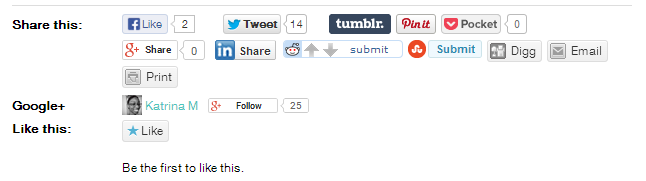
Use the CSS below as a place to start for your style changes. Please know that it only works if you have the “Icon + Text” button style option selected.
/*  Jetpack
--------------------------------------------- */
#wpstats {
	display: none;
}

.content .sd-content ul {
	text-align: center;
}

.content .share-count {
	color: #ceebd1;
	padding: 3px 5px;
}

.content .sd-social-icon .sd-content ul li a.sd-button,
.content .sd-social-text .sd-content ul li a.sd-button,
.content .sd-content ul li a.sd-button,
.content .sd-content ul li .option a.share-ustom,
.content .sd-content ul li.preview-item div.option.option-smart-off a,
.content .sd-content ul li.advanced a.share-more,
.content .sd-social-icon-text .sd-content ul li a.sd-button,
.content .sd-social-official .sd-content > ul > li > a.sd-button,
.content #sharing_email .sharing_send,
.sd-social-official .sd-content > ul > li .digg_button > a {
	background: #f8f8f8 !important;
	color: #333 !important;
	border: none !important;
	border-radius: 0 !important;
	box-shadow: none !important;
	padding: 10px 10px !important;
	text-transform: uppercase;
}

div.sharedaddy h3.sd-title::before {
    border: none !important;
    content: "";
    display: block;
    margin-bottom: 1em;
    min-width: 30px;
    width: 100%;
}

.content div.sharedaddy h3.sd-title {
	font-size: 13px;
	font-weight: 300;
	text-align: center;
	text-transform: uppercase;
	width: 100%;
}

Share Your Thoughts