• Skip to primary navigation
  • Skip to main content
  • Skip to primary sidebar

Riot Customs

Genesis WordPress Development, Maintenance & Support

  • About
  • Services
  • Blog
  • Shop
  • Contact

Where to add Google Analytics in Genesis

Written by Katrina

If you recently made the switch to the Genesis Framework and are a bit confused on where to place your Analytics tracking code. By following these simple steps we will get you on the right track.

Step 1: Copy your tracking info or code
Step 2: In your dashboard click on Genesis > Theme Settings
Step 3: Paste code in the top section of Header and Footer Scripts
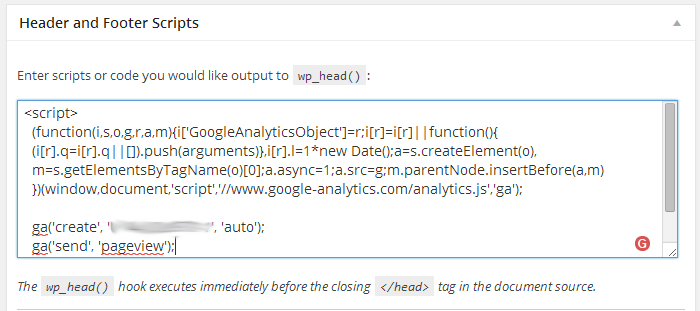
analytics
Step 4: Click save and your are done.

See how easy that was?

Previous Post
Next Post

GenesisWP, Tutorials Leave a Comment

Reader Interactions

Share Your Thoughts
Cancel reply

Your email address will not be published. Required fields are marked *

I accept the Privacy Policy

This site uses Akismet to reduce spam. Learn how your comment data is processed.

Primary Sidebar

Categories

  • Blogging
  • Business
  • Client Work
  • ConvertKit
  • Freebie
  • GenesisWP
  • Interact
  • Personal
  • Theme Releases
  • Theme Updates
  • Tools & Software
  • Tutorials
  • Web Design
  • WordPress

Master ConvertKit

A kick ass tech course on using the ConvertKit software. Want to start growing your list with the best email marketing software out there? What are you waiting for? Grab this course now!

Enroll Now!
Buy me a coffee
Newsletter

Tails from the Beast

Join our newsletter for tips on how to use the WordPress platforms. Advance your skills, and most importantly, puppy photos.

Please enter your name.
Please enter a valid email address.
Sign Me Up!

Thanks for subscribing! Please check your email for further instructions.

Something went wrong. Please check your entries and try again.

Development Information

  • How it Works
  • Trusted Partners
  • Portfolio
  • Client Portal

Explore

  • Resources
  • ConvertKit Services
  • Terms of Service
  • Privacy Policy
  • Disclamier

© 2009 - 2025 Riot Customs, LLC.

Powered by Flywheel & Beaver Builder.